Demystifying systems programming: Linux (Android) binder driver
Introduction
Binder is an IPC mechanism pretty much only used on Android (although it didn't originate there). Even though Android uses a Linux kernel, the software running on top of that kernel looks very different from a "typical" Linux system. Much of what makes Android "actually work like Android" probably involves Binder under the hood.
Linux already has a ton of IPC mechanisms, such as pipes, FIFOs (also called "named pipes"), sockets (networking and networking-adjacent protocols), System V IPC, POSIX IPC (an updated System V IPC), and shared memory. However, binder is… different from all of them. As is typical, I feel it's important to experiment with and understand what these differences are.
This investigation was started because I noticed that, beyond "standard" IPC mechanisms, all of the current major platforms also have their own "special" IPC mechanisms, all somehow slightly different. Linux desktop has D-Bus, Windows has COM, macOS has XPC, and Android has binder. How are these similar or different? Is a Grand Unified Theory of IPC possible? Or is this situation inevitable?
Binder is a rather "opinionated" mechanism designed for efficient remote procedure calls between different processes (on the same computer). These procedures are invoked on "objects" (in the object-oriented programming sense) which binder thus knows about and helps reference-count. It can be compared with "distributed object" frameworks which were popular in the '90s and '00s, except that binder specifically only works on a single computer and doesn't work across a network. This means that binder can have unique features such as immediately switching to and running the recipient thread (rather than waiting for the OS to eventually get around to scheduling it).
Like many of the aforementioned frameworks, binder was also not designed to be used directly but is instead hidden behind many layers of abstraction and code generation tools. However, binder is actually in the upstream Linux kernel, which should (theoretically) mean that it is subject to the same "WE DO NOT BREAK USERSPACE!" guarantees as any other Linux API. This means we can do our own thing from the bottom up, even though there is little help or guidance in doing so.
Setting up
Binder is initially set up using a virtual filesystem called binderfs. To use it, you will need a kernel with the appropriate options enabled. Consult your distro documentation for more information (a number of desktop distributions do have this enabled).
In order to create an instance of a binderfs filesystem, we need to mount it somewhere. For example, as root:
mkdir /tmp/bindertest
mount -t binder binder /tmp/bindertest
If this completes successfully, a binder-control file will be present:
$ ls /tmp/bindertest/
binder-control  features
In order to create a binder device for doing IPC, we need to issue ioctls against the binder-control device. The ABI for these ioctls (or ioctl, singular) is defined in this header file. The following Rust code can be used:
use std::ffi::OsStr;
use std::fmt::Debug;
use std::io;
use std::os::fd::AsRawFd;
use std::os::unix::ffi::OsStrExt;
use std::os::unix::fs::PermissionsExt;
use std::path::PathBuf;
use std::process::ExitCode;

/// The parameters for the device creation command
#[repr(C)]
#[derive(Clone, Copy, PartialEq, Eq)]
pub struct binderfs_device {
    /// Device filename
    pub name: [u8; 256],
    /// Major device number, returned by kernel
    pub major: u32,
    /// Minor device number, returned by kernel
    pub minor: u32,
}
impl Default for binderfs_device {
    fn default() -> Self {
        Self {
            name: [0; 256],
            major: 0,
            minor: 0,
        }
    }
}
impl Debug for binderfs_device {
    fn fmt(&self, f: &mut std::fmt::Formatter<'_>) -> std::fmt::Result {
        f.debug_struct("binderfs_device")
            .field("name", &OsStr::from_bytes(&self.name))
            .field("major", &self.major)
            .field("minor", &self.minor)
            .finish()
    }
}

fn main() -> io::Result<ExitCode> {
    let args = std::env::args_os().collect::<Vec<_>>();

    if args.len() < 3 {
        println!(
            "Usage: {} /path/of/binderfs devname",
            args[0].to_string_lossy()
        );
        return Ok(ExitCode::FAILURE);
    }

    let binderfs_path = &args[1];
    let devname = &args[2];

    let devname_bytes = devname.as_bytes();
    if devname_bytes.len() > 255 {
        println!("devname is too long (max 255 chars)");
        return Ok(ExitCode::FAILURE);
    }

    // Open binder-control
    let mut binderfs_control = PathBuf::from(binderfs_path);
    binderfs_control.push("binder-control");

    let binderfs_control_file = std::fs::File::open(binderfs_control)?;
    let mut perm_0666 = binderfs_control_file.metadata()?.permissions();
    perm_0666.set_mode(0o666);
    let binderfs_control_fd = binderfs_control_file.as_raw_fd();

    // Set up args
    let mut ioctl = binderfs_device::default();
    ioctl.name[..devname_bytes.len()].copy_from_slice(devname_bytes);

    // Make the syscall
    let ret = unsafe {
        libc::ioctl(
            binderfs_control_fd,
            libc::_IOWR::<binderfs_device>(b'b' as u32, 1),
            &mut ioctl,
        )
    };
    if ret < 0 {
        return Err(io::Error::last_os_error());
    }

    // chmod to 0666 so we don't have to run other commands as root later
    let mut binder_result_path = PathBuf::from(binderfs_path);
    binder_result_path.push(devname);
    std::fs::set_permissions(binder_result_path, perm_0666)?;

    Ok(ExitCode::SUCCESS)
}
If we compile this code and then run it as root, we should get:
$ sudo ./target/debug/makebinder /tmp/bindertest binder
$ ls /tmp/bindertest/
binder  binder-control  features
Notice the binder device which we have now created!
As explained in the kernel documentation, binder devices can be deleted using commands such as rm.
Understanding Linux ioctls and UAPI headers
ioctl is a system call for performing driver-specific operations on a file. This… isn't exactly well-defined, and different drivers can use this to do wildly different things. For example, one of the earliest uses of ioctl was to control terminals, pseudoterminals, and serial ports. Many Linux hardware driver APIs, such as for USB or 3D graphics, use ioctl to submit requests. In our case, binder uses ioctl to do basically everything (instead of, for example, using read/write or adding new dedicated system calls).
ioctl requests contain a command (which is a number) and optionally a pointer to some more data. Although this command can be any number, Linux has a convention to help organize the numbers being used. This convention breaks the number up into a subsystem (called type), a command (called nr), the size of the additional data, and the expected direction that data will be transferred.
Some of the reasons for organizing the command numbers this way are:
- to help reduce the chances that sending a command to the wrong driver will accidentally do something random (instead, the number wouldn't be recognized, because the subsystem would be different)
- to allow the additional data to be changed in the future (changing the size of the data changes the
ioctlcommand number, so it is possible to tell the difference between old and new versions) - to allow programming languages to try to check that the correct data was passed (this is not possible in C, but a better Rust
ioctlAPI could theoretically do this)
The uAPI (userspace API) header file for binderfs defines a single ioctl:
#define BINDER_CTL_ADD _IOWR('b', 1, struct binderfs_device)
According to the Linux convention, the subsystem is the value 'b' (or 98 in decimal) and the actual command number is 1. The data is both sent to and received back from the kernel (WR), and the type of this data is struct binderfs_device. This struct is defined above in the header file, and we have translated it to its Rust equivalent.
When we issue the ioctl call, we specify the name field only. When the call is finished, the kernel modifies the data we pass in and tells us the major and minor device numbers of the binder device we just created. We don't actually have a use for this, and so we ignore it. However, because the kernel writes to the struct we pass in, it is important to pass a &mut pointer.
The binder device node itself (rather than the binder-control file) has these ioctls.
Opening a binder device
A binder device node can be opened just like a regular file:
let devname = &args[1];
let binder_file = std::fs::File::open(devname)?;
let binder_fd = binder_file.as_raw_fd();
dbg!(binder_fd);
Interestingly, it does not seem to matter what open mode is used, and so the normal Rust std::fs::File::open works just fine. However, we need to extract the raw file descriptor in order to do anything useful with the file (normal reading and writing doesn't work).
One of binder's special optimizations (because it's designed specifically for local RPC) is that it can copy data directly from one program to another, without making an extra copy inside the kernel. This is in contrast to a pipe which more-or-less is explicitly a buffer inside the kernel. This is also slightly different from shared memory in that the kernel handles memory allocation in the recipient process (and so the two processes do not share the exact same memory layout).
In order for a user program to coordinate with the kernel where to put this data, it uses the mmap syscall:
let mmap_addr = unsafe {
    libc::mmap(
        ptr::null_mut(),
        1024 * 1024,
        libc::PROT_READ,
        libc::MAP_PRIVATE | libc::MAP_NORESERVE,
        binder_fd,
        0,
    )
};
if mmap_addr as isize == -1 {
    return Err(io::Error::last_os_error());
}
dbg!(mmap_addr);
This code allocates 1 MiB of total space that the kernel will allocate from to store data received from other programs. Because the kernel is in control of managing this space, it only allows your program to map it read-only (PROT_READ). This prevents race conditions between the user program and the kernel.
To actually do anything useful, we use ioctl as mentioned. The most basic ioctl checks the supported API version:
pub fn binder_version(fd: i32) -> io::Result<i32> {
    let mut ver = 0;

    let ret = unsafe { libc::ioctl(fd, libc::_IOWR::<i32>(b'b' as u32, 9), &mut ver) };
    if ret < 0 {
        return Err(io::Error::last_os_error());
    }

    Ok(ver)
}
This ioctl is declared in the C header as exchanging a binder_version struct. However, this struct has the following contents:
/* Use with BINDER_VERSION, driver fills in fields. */
struct binder_version {
    /* driver protocol version -- increment with incompatible change */
    __s32       protocol_version;
};
This means that the struct has the exact same size and layout as a 32-bit signed integer, so we can cheat in our Rust code and perform the ioctl with an i32. Cheating in this way might complicate handling future upgrades to the protocol, however (e.g. if additional fields are added to the struct).
Combining all of the above code into a complete program might output something like the following:
[src/bin/server.rs:22:5] binder_fd = 3
[src/bin/server.rs:37:5] mmap_addr = 0x00007f886e684000
[src/bin/server.rs:39:5] binder_version(binder_fd)? = 8
The version 8 matches the uAPI header file, and a proper program should check that the version is as expected (our example code will print it out but won't bother verifying).
Bootstrapping
Binder RPCs are made on objects. Now that we've opened a binder device node, how do we get hold of an object to send requests to? Other programs can send us object references in reply to our own RPCs (discussed later), but how do we get a first object?
This is a classic bootstrapping problem encountered by many microkernel operating systems, and the usual solution is to make a single special global bootstrapping service. In binder, this is called the context manager in the driver layer or ServiceManager in the Android OS core. Calls can be made to this manager by using an object reference with a value of 0.
In our case, we designate one process as the context manager by making the BINDER_SET_CONTEXT_MGR ioctl:
pub fn binder_set_context_mgr(fd: i32) -> io::Result<()> {
    let zero = 0i32;
    let ret = unsafe { libc::ioctl(fd, libc::_IOW::<i32>(b'b' as u32, 7), &zero) };
    if ret < 0 {
        return Err(io::Error::last_os_error());
    }

    Ok(())
}
The driver will only allow one program to do this.
Becoming a server
When making a RPC, binder refers to the process making the call as the client and the process handling the call as the server. These client and server roles change if the (initial) server goes on to make a further RPC, called a nested transaction. The initial server can even make a RPC back to the initial client. Contrast this with a "networking" architecture (e.g. HTTP) where "server" and "client" are much more clearly distinct roles at a process level rather than at a transaction level.
For our simple demonstration, we will make one program that only ever acts as a server and a second program that makes one request (acting as a client) and then exits. This wouldn't work properly in the general case for something like Android, but it is enough to explore the principles.
In order for the binder driver to actually send us requests, we need to send the driver the BC_ENTER_LOOPER command, which… isn't an ioctl, even though it looks like one. The reason this command is necessary is because binder knows about (and somewhat controls, see BR_SPAWN_LOOPER) process thread pools as part of its scheduling tricks. If binder does not know that our server process is ready to handle requests, it won't deliver any to the process.
Turtles all the way down (binder commands)
Binder commands are sent inside a BINDER_WRITE_READ ioctl. This allows multiple commands to be sent (and multiple replies to be received) in a single system call, which reduces the overhead of switching between user and kernel mode.
Confusingly, even though commands look exactly like ioctls (using the same _IO* macros), they are not!
The payload for the BINDER_WRITE_READ ioctl is a struct binder_write_read which contains pointers to two byte buffers:
struct binder_write_read {
    binder_size_t       write_size; /* bytes to write */
    binder_size_t       write_consumed; /* bytes consumed by driver */
    binder_uintptr_t    write_buffer;
    binder_size_t       read_size;  /* bytes to read */
    binder_size_t       read_consumed;  /* bytes consumed by driver */
    binder_uintptr_t    read_buffer;
};
Commands and returned data are packed (serialized) into these buffers. They consist of a 32-bit number (a member of either the binder_driver_command_protocol or binder_driver_return_protocol enum) followed by the payload data as indicated by the _IO* constants. Note that this will not necessarily have the proper alignment for the struct!
This is probably best explained with an example. To send the BC_ENTER_LOOPER command, the data looks like this:
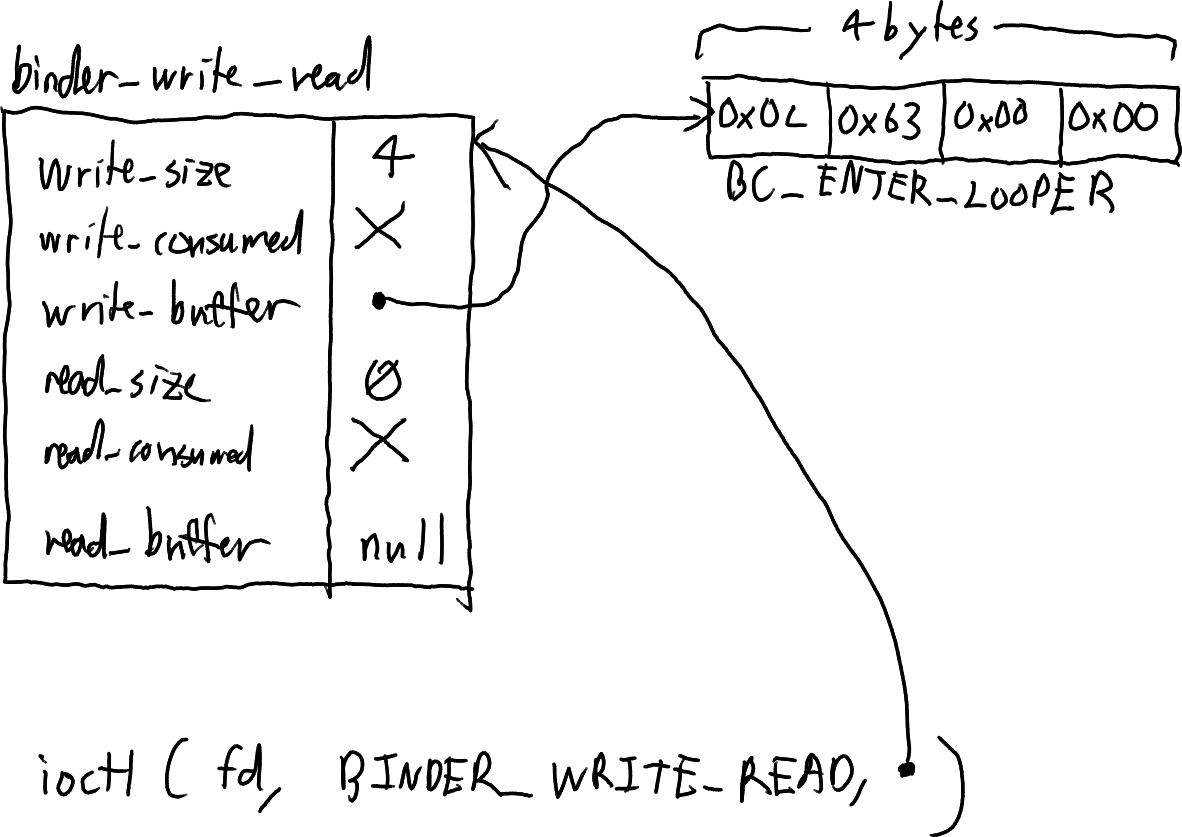
In this case, there is only one command and no payload, so the entire buffer is 32 bits or 4 bytes.
Making a client RPC request
At this point, we have a basic server that would be sent requests (even though it currently doesn't know how to reply). We will now skip over to working on a client.
A client will need to open a binder device and call mmap just like the server, but then it can issue a BC_TRANSACTION command. Clients do not need to send BC_ENTER_LOOPER. In the serialized buffer, this command is followed by a struct binder_transaction_data.
Inside this struct, target.handle is set to 0 in order to communicate with the context manager. code contains the function to be executed (which can be any number the client and server agree upon). Finally, buffer points to the data to be transferred, and data_size is its size (offsets will be explained later).
To send a transaction, our example code does this:
let datadatadata = b"Hello world!";
let mut txn_data = binder_transaction_data::default();
txn_data.code = 12345;
txn_data.buffer = datadatadata.as_ptr() as *const libc::c_void;
txn_data.data_size = datadatadata.len();
let mut txn = [0u8; std::mem::size_of::<binder_transaction_data>() + 4];
txn[..4].copy_from_slice(&BC_TRANSACTION.to_ne_bytes());
txn[4..].copy_from_slice((&txn_data).into());
binder_write(binder_fd, &txn)?;
As a diagram, this looks like this:
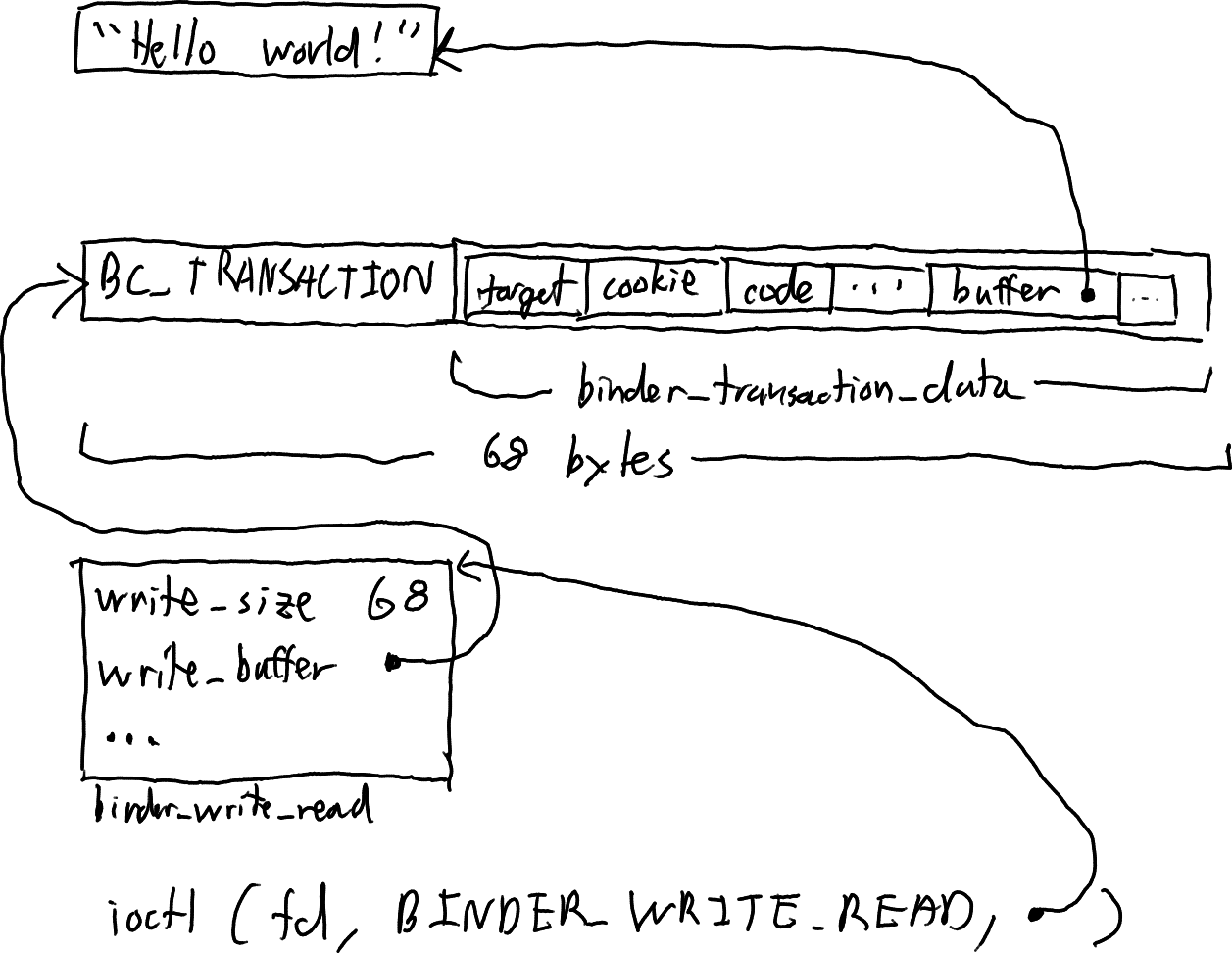
Notice that the binder_transaction_data has an alignment of 8 bytes, but it is packed, unaligned, at an offset of +4 bytes into the buffer!
Finally, we wait for a reply, print it out, and then exit:
'outer: loop {
    let rdata = binder_read(binder_fd)?;
    let mut rdata = rdata.as_slice();

    while rdata.len() > 4 {
        let rep = u32::from_ne_bytes([rdata[0], rdata[1], rdata[2], rdata[3]]);
        rdata = &rdata[4..];

        match rep {
            BR_NOOP => println!("BR_NOOP"),
            BR_TRANSACTION_COMPLETE => println!("BR_TRANSACTION_COMPLETE"),
            BR_REPLY => {
                println!("BR_REPLY");
                if let Some((reply, new_rdata)) = binder_transaction_data::try_from_bytes(rdata)
                {
                    rdata = new_rdata;
                    let _ = rdata;
                    println!("{:#x?}", reply);
                    break 'outer;
                }
            }
            _ => println!("Unknown reply 0x{:08x}", rep),
        }
    }
}
Implementing the server
On the server, we need a similar loop to handle requests:
loop {
    let rdata = binder_read(binder_fd)?;
    let mut rdata = rdata.as_slice();

    while rdata.len() > 4 {
        let rep = u32::from_ne_bytes([rdata[0], rdata[1], rdata[2], rdata[3]]);
        rdata = &rdata[4..];

        match rep {
            BR_NOOP => println!("BR_NOOP"),
            BR_TRANSACTION => {
                println!("BR_TRANSACTION");
                if let Some((txn, new_rdata)) = binder_transaction_data::try_from_bytes(rdata) {
                    rdata = new_rdata;
                    println!("{:#x?}", txn);

                    let mut reply_data = binder_transaction_data::default();

                    match txn.code {
                        12345 => {
                            let test_data = unsafe {
                                std::slice::from_raw_parts(
                                    txn.buffer as *const u8,
                                    txn.data_size,
                                )
                            };
                            println!("Test command! {}", String::from_utf8_lossy(test_data));
                            reply_data.flags = TF_STATUS_CODE;
                            reply_data.code = 0xfeedface;
                        }
                        _ => {
                            println!("Unknown command {}", txn.code);
                            reply_data.flags = TF_STATUS_CODE;
                            reply_data.code = 0xdeadbeef;
                        }
                    }

                    let mut reply =
                        [0u8; std::mem::size_of::<binder_transaction_data>() + 4 + 8 + 4];
                    reply[0..4].copy_from_slice(&BC_FREE_BUFFER.to_ne_bytes());
                    reply[4..12].copy_from_slice(&(txn.buffer as usize).to_ne_bytes());
                    reply[12..16].copy_from_slice(&BC_REPLY.to_ne_bytes());
                    reply[16..].copy_from_slice((&reply_data).into());
                    binder_write(binder_fd, &reply)?;
                } else {
                    break;
                }
            }
            _ => println!("Unknown reply 0x{:08x}", rep),
        }
    }
}
This code also demonstrates how multiple commands can be sent in the same ioctl:
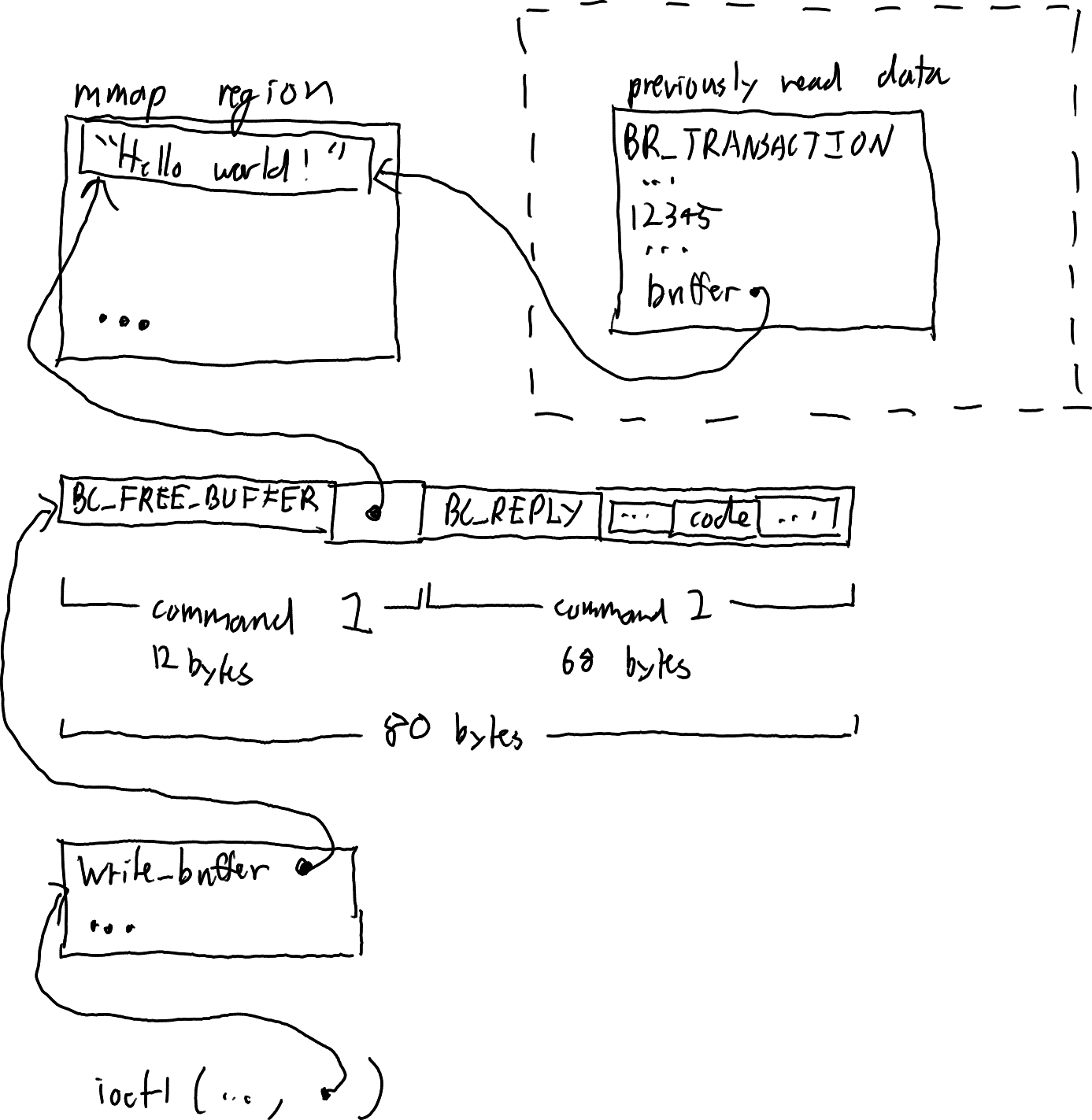
Because the kernel allocates memory to store received data, we need to ask the kernel to free it by using the BC_FREE_BUFFER command. For efficiency, we can perform the BC_REPLY at the same time. The binder driver magically knows that the BC_REPLY corresponds to the transaction we just read.
Putting it all together
The complete code for this demonstration can be found here.
Running the server in one terminal window and then running the client twice will output something like the following:
$ ./target/debug/server /tmp/bindertest/binder
[src/bin/server.rs:22:5] binder_fd = 3
[src/bin/server.rs:37:5] mmap_addr = 0x00007f6f8405a000
[src/bin/server.rs:39:5] binder_version(binder_fd)? = 8
BR_NOOP
BR_TRANSACTION
binder_transaction_data {
    target: _handle_or_ptr(
        0x0000000000000000,
    ),
    cookie: 0x0000000000000000,
    code: 0x3039,
    flags: 0x0,
    sender_pid: 0x1f873,
    sender_euid: 0x3e8,
    data_size: 0xc,
    offsets_size: 0x0,
    buffer: 0x00007f6f8405a000,
    offsets: 0x0000000000000000,
}
Test command! Hello world!
BR_NOOP
BR_NOOP
BR_TRANSACTION
binder_transaction_data {
    target: _handle_or_ptr(
        0x0000000000000000,
    ),
    cookie: 0x0000000000000000,
    code: 0x3039,
    flags: 0x0,
    sender_pid: 0x1f87d,
    sender_euid: 0x3e8,
    data_size: 0xc,
    offsets_size: 0x0,
    buffer: 0x00007f6f8405a000,
    offsets: 0x0000000000000000,
}
Test command! Hello world!
BR_NOOP
$ ./target/debug/client /tmp/bindertest/binder
[src/bin/client.rs:22:5] binder_fd = 3
[src/bin/client.rs:37:5] mmap_addr = 0x00007ff7f645f000
[src/bin/client.rs:39:5] binder_version(binder_fd)? = 8
BR_NOOP
BR_TRANSACTION_COMPLETE
BR_REPLY
binder_transaction_data {
    target: _handle_or_ptr(
        0x0000000000000000,
    ),
    cookie: 0x0000000000000000,
    code: 0xfeedface,
    flags: 0x8,
    sender_pid: 0x0,
    sender_euid: 0x3e8,
    data_size: 0x0,
    offsets_size: 0x0,
    buffer: 0x00007ff7f645f000,
    offsets: 0x0000000000000000,
}
$ ./target/debug/client /tmp/bindertest/binder
[src/bin/client.rs:22:5] binder_fd = 3
[src/bin/client.rs:37:5] mmap_addr = 0x00007fc1dd451000
[src/bin/client.rs:39:5] binder_version(binder_fd)? = 8
BR_NOOP
BR_TRANSACTION_COMPLETE
BR_REPLY
binder_transaction_data {
    target: _handle_or_ptr(
        0x0000000000000000,
    ),
    cookie: 0x0000000000000000,
    code: 0xfeedface,
    flags: 0x8,
    sender_pid: 0x0,
    sender_euid: 0x3e8,
    data_size: 0x0,
    offsets_size: 0x0,
    buffer: 0x00007fc1dd451000,
    offsets: 0x0000000000000000,
}
Notice that the buffer returned from the kernel is always within the mmaped memory region, and that the server has access to the process ID and user ID of the sending process.
Going further
In addition to just transferring bytes, binder allows transferring structured data. The list of offsets of this structured data within the buffer to be transferred is passed in the offsets field of the binder_transaction_data struct. Each piece of structured data starts with a binder_object_header which contains a 32-bit integer.
A "binder" object is the "objects on which methods can be invoked" that the binder driver keeps track of. When sending a "binder" object to another process, the binder driver maps it to a "handle" object. This can be sent to further processes (updating reference counts), but it is turned back into a "binder" object when sent to the process it originated from. In the original process, a "binder" object is a pointer-sized value. In other processes, "handles" are 32-bit numbers.
It is also possible to send either a file descriptor or an array of file descriptors. This clones the file descriptor into the recipient process, similar to sending SCM_RIGHTS over a unix domain socket.
Finally, it is possible to send a set of buffers, and the binder driver can fix up pointers to these buffers so that they are adjusted for the recipent process address space. Using this, complex data structures can be sent.
Unfortunately, there is not a lot of documentation on how this all works at a low level. Some useful resources I found include the following: